

How FBA Reimbursements Work: Amazon’s System for Making Good on a Promise It Made in Writing
FBA Reimbursements aren’t Amazon being generous. They’re Amazon keeping a promise it made in writing, for a problem its own scale makes inevitable.
When you enroll in Fulfillment by Amazon, you hand Amazon physical custody of your inventory. Amazon takes your units into its fulfillment centers, moves them through its network, and ships them out to customers. That arrangement only works on a basic premise. Amazon will take responsibility and accountability for your inventory, and if something goes wrong on Amazon’s side, Amazon will make it right. At Amazon’s volume, loss, damage, and billing errors aren’t an edge case. They’re a statistical certainty built into how the system runs, and the obligation to fix them is clearly stated, not improvised.
Table of Contents
- The Explanation Most Sellers Default To
- Why Reimbursements Exist: It’s In the Contract You Signed
- How Amazon Decides What to Pay You
- Where the System Shows Its Edges
- Why Amazon Probably Built It This Way
- How Reimbursements Actually Hit Your Books
- Tips: How to Navigate It
The Explanation Most Sellers Default To
If you’ve spent any time in an FBA seller forum, you’ve seen the same explanation repeated for almost every reimbursement complaint: Amazon is shorting me on purpose, or the system is rigged to pay out as little as possible. It’s an understandable reaction. You sent inventory you paid for, Amazon lost or damaged some of it, and the number that came back feels arbitrary.
That explanation doesn’t hold up against what’s actually happening, and it doesn’t help you to feel that way. A more accurate and more useful way to think about it is that a formal compensation system exists precisely because Amazon expects, and accounts for, errors at scale. Millions of units move through Amazon’s fulfillment network every day. Some get lost. Some get damaged. Some fees get applied incorrectly. A reimbursement isn’t Amazon doing you a favor. Amazon is upholding its end of the contract.
So, if it’s not theft and it’s not “customer support” for sellers, what is it actually? It’s a formal system that exists because Amazon expects and accounts for failure at scale. That raises the obvious next question: Is that system actually described somewhere, or is Amazon just expecting you to trust them?
Why FBA Reimbursements Exist: It’s In the Contract You Signed
If this is the first post of mine you’re reading on FBA reimbursements, here’s the short version. An FBA reimbursement is a payment or replacement item Amazon issues when something it was responsible for goes wrong with your inventory. This can include a unit lost in a warehouse, damaged in transit, a fee charged incorrectly, and any other place where Amazon is responsible for your inventory, costs, and customer support. When Amazon issues one, it shows up in your Reimbursements report or on the Payments report, and it affects your account in a very concrete way. It’s either cash that helps your margin directly, or a replacement unit that doesn’t touch your cash flow the same way (more on that distinction later in this post). The rest of this post, and the posts that follow it on specific claim types, are about understanding that mechanism well enough to work within it.
Here’s the part most sellers skip. Most of what frustrates you about this system is written down, in plain language, in the actual contract you agreed to when you became a seller: the Amazon Services Business Solutions Agreement (BSA). The clearest example sits in the section governing storage:
“We will provide storage services as described in these FBA Service Terms once we confirm receipt of delivery.” — Amazon Services Business Solutions Agreement, Section F-4 (Storage)
That single sentence is the custody arrangement in contract form. Amazon’s obligation to look after your inventory doesn’t start the moment you ship it. It starts once Amazon confirms it has received it. The same section spells out what happens if something goes wrong while Amazon has that custody:
“If there is a loss of or damage to any Units while they are being stored, we will compensate you in accordance with the FBA Guidelines… At all other times, you will be solely responsible for any loss of, or damage to, any Units.” — Amazon Services Business Solutions Agreement, Section F-4 (Storage)
Notice the structure of that sentence. Amazon’s reimbursement obligation isn’t open-ended. It’s bounded by confirmed custody. Before Amazon confirms receipt, or after Amazon has properly handed your inventory back, responsibility is yours. That’s also the direct line to why proof of delivery, like a signature, a stamp, or a bill of lading, matters so much for a claim you have to file yourself. The FBA inventory reimbursement policy’s eligibility list requires the same logic from the other direction:
“You have sent us the exact items and quantities stated in your shipping plan.” — Amazon Seller Central, FBA Inventory Reimbursement Policy
If your shipment doesn’t match what you told Amazon you were sending, Amazon never had verified custody of those units, and the obligation above doesn’t apply. The documentation isn’t bureaucracy for its own sake. It’s what establishes that Amazon actually had what you say it lost.
There’s a disclaimer in the same BSA section worth knowing about, too, because it cuts the other way:
“Our confirmed receipt of delivery does not: (a) indicate or imply that any Unit has been delivered free of loss or damage, or that any loss or damage to any Unit later discovered occurred after confirmed receipt of delivery; (b) indicate or imply that we actually received the number of Units of Your Product(s) specified by you for such shipment.” — Amazon Services Business Solutions Agreement, Section F-4 (Storage)
In plain terms, Amazon confirming it received your shipment isn’t Amazon conceding it received everything you say you sent, or that nothing was already damaged when it arrived. That’s exactly where inbound shipment disputes live, and it’s why the burden of proof defaults to the seller on those claims.
The contract isn’t arbitrary. Confirmed custody creates the obligation, the FBA Guidelines set the actual payout terms the contract points to, and the receipt disclaimer is what keeps the burden of proof on you when your shipment doesn’t match what arrived. That raises the next real question. Where, specifically, does Amazon’s responsibility apply, and how does Amazon actually decide what to pay you when it does?
How Amazon Decides What to Pay You
Amazon’s responsibility covers a few functional areas.
- Warehouse operations: once your inventory arrives at a fulfillment center, Amazon controls how it’s stored, moved, and picked, and a unit lost or damaged inside that process is Amazon’s responsibility.
- Inbound and outbound shipments: Amazon’s responsibility for inventory in transit applies only when Amazon itself operated the carrier or arranged it on Amazon’s behalf, not to transit generally.
- Fulfillment cost and fee accuracy: Amazon is also responsible for charging the correct referral, fulfillment, and storage fees, and a miscalculation here is reimbursable too, even with no inventory lost or damaged.
The individual posts in this series go deeper on each specific claim type. This post is about the system, not the catalog of scenarios.
On that second point specifically, the policy is direct about where the line sits:
“If an item you send to us as part of the Fulfillment by Amazon (FBA) service is lost or damaged at a facility or by a carrier operated by Amazon or on behalf of Amazon, we replace that item with a new item of the same product or reimburse you for it.” — Amazon Seller Central, FBA Inventory Reimbursement Policy
If you ship to Amazon using your own carrier, the obligation doesn’t start until Amazon confirms receipt, the same boundary covered in the BSA section above. Removals run the same logic in reverse: Amazon arranges the carrier sending inventory back to you, so transit damage on that leg is Amazon’s responsibility, which is also why a removal lost in transit gets its own claim window later in this post.
But being on the hook and paying you fair value aren’t the same thing. Once Amazon agrees something is reimbursable, the next question is how much, and Amazon’s policy draws a hard line based on timing: whether the item was lost or damaged before a customer ordered it, or after.
For pre-order events, meaning shipment to Amazon claims, removal claims, and fulfillment center operations claims, the policy states:
“…we will reimburse you the sourcing cost of the item.” — Amazon Seller Central, FBA Inventory Reimbursement Policy
That’s a relatively recent rule. Before March 31, 2025, Amazon calculated these reimbursements differently, treating every lost pre-order unit as a lost sale, valued at an estimated sale price built from several pricing benchmarks, including the median price the item sold for over the prior 18 months, minus fees. Amazon’s own announcement of the change described what was being replaced, and what would continue unchanged for a different category of claim:
“Effective March 31, 2025, we’ll reimburse you based on the product sourcing cost of the affected inventory.” “For items that are lost or damaged after a customer order in Amazon’s store, we’ll continue to reimburse you for the sales price on the original order minus applicable fees.” — Amazon Seller Central, Changes to Program Policies: 2024 Update to the FBA Inventory Reimbursement Policy

So the same announcement, the same effective date, treats pre-order and post-order losses on two different bases now. Pre-order claims are valued at the sourcing cost. Post-order claims, meaning customer returns, are still valued at the sale price minus fees, because an actual sale occurred. Sourcing cost itself is defined narrowly:
“‘Sourcing cost’ means your cost to source a product from a manufacturer, wholesaler, reseller, or produce the item if you are the manufacturer. It excludes costs such as shipping, handling, customs duties, or other costs.” — Amazon Seller Central, FBA Inventory Reimbursement Policy
In other words, what you paid to acquire the unit, not what you would have made selling it, and not the full landed cost of getting it to a fulfillment center either.
There’s a reasonable explanation for why the basis narrowed this way, separate from anything the policy states directly. The old method, sale price minus fees, assumed every lost pre-order unit represented a guaranteed future sale, crediting you as if your listing would have converted for certain. That assumption doesn’t hold up at scale. Not every unit sitting in a fulfillment center is actually going to sell. Sourcing cost reads less like Amazon cutting what it owes you and more like Amazon stopping a bet on your conversion rate it shouldn’t have been making in the first place. It also lines up with a more basic principle: the services Amazon actually performed, storing the unit, shipping it inbound, were rendered whether or not that unit ever sold, the same way you’d owe for those services on a unit that sold normally, was returned, or was removed. What’s genuinely lost when a pre-order unit disappears isn’t the sale, since that was never guaranteed. It’s the unit itself, valued at what you paid to source it. This is a read of the policy’s likely logic, not something Amazon states outright, so treat it as a reasonable inference rather than a confirmed fact.
A few other mechanics worth knowing. The maximum reimbursement for any single unit is $5,000, and Amazon’s policy recommends third-party insurance above that value. Amazon also has real discretion over the cost figure itself. You can submit your own sourcing cost through the Manage Your Sourcing Cost tool, but Amazon can decline it if your submission is, in the policy’s own words, “an outlier compared to similar products or our cost estimate.” If you don’t submit one, or yours is declined, Amazon falls back to its own estimate, generated from comparable products sold by Amazon, by other sellers, and through other wholesale channels. An approved sourcing cost isn’t permanent either. Amazon periodically refreshes its cost estimates, and if a refresh affects a cost you previously submitted, you get notice and a chance to review before it takes effect.
The pre/post-order split and the cap answer “how much.” But the historical pivot is the real sting here. That basis is narrower than what many sellers actually paid to get a unit into Amazon’s network in the first place. Is this actually fair, or are there real gaps in how this system protects you?
Where the System Shows Its Edges
Since November 1, 2024, Amazon has proactively reimbursed most warehouse and customer-return losses without you filing anything. Amazon’s own announcement is specific about the scope of that automation, and specific in a way worth reading twice:
“Almost all reimbursement claims related to warehouse lost and damaged and customer returns cases will now be proactively reimbursed. However, if you do not receive an automatic reimbursement and you believe that your inventory has been lost or damaged, you will need to file a manual claim.” — Amazon Seller Central, Update on Reimbursement Automation and Eligibility Window to File Reimbursement Claims (2024)
“Almost all” is doing real work in that sentence. Amazon never defines where the automation’s coverage ends. The same announcement confirms the manual fallback exists precisely because Amazon knows the automation won’t catch everything.
The clock on that fallback is also shorter than it used to be. Before this 2024 update, the fulfillment center operations claim window alone gives a sense of how much has changed:
“You must submit your claim no later than 18 months after the date the item was reported lost or damaged in your Inventory Adjustment report. Claims submitted outside of this window are not eligible for reimbursement.” — Amazon, FBA Inventory Reimbursement Policy: Fulfillment Center Operations Claim (archived, January 2022)
That’s 18 months down to 60 days, roughly a nine-fold reduction, for fulfillment center operations claims specifically. The same 2024 announcement set the current windows across the board: 60 days for a fulfillment center operations claim from when it’s reported, 60 to 120 days for a customer returns claim after the refund, 15 to 75 days for a removal lost in transit, and 60 days for other removal claims from delivery back to you. Shipment to Amazon and removal claims were never part of the automation. They remain entirely manual, every time.

The practical question for any seller is simple: how do you know if “almost all” caught your loss? The answer is the Inventory Defect and Reimbursement (IDR) portal, which Amazon describes as:
“…a single, centralized portal to manage inventory-related defects in Amazon’s network and their associated resolutions.” — Amazon Seller Central, Inventory Defect and Reimbursement (IDR) Portal
It organizes everything into three tabs: Eligible for Claim (defects that need your input before Amazon will act), In Progress (under Amazon’s review, no action needed from you), and Resolved (Amazon’s decision, including whether you were paid in cash or inventory). Checking the Eligible for Claim tab is the fastest way to find out whether automation missed something, before your window on it closes.
The gap named “almost all” is real, and the IDR portal is how you check whether it touched you specifically.
It’s worth sizing that gap before moving on, though. Reimbursement services that market their own cut often frame the opportunity as recovering 1 to 3 percent of your monthly sales. Read in proportion, that figure cuts both ways. It confirms the gap is real and worth checking on. It also confirms that the other 97 to 99 percent of what moves through Amazon’s network goes through correctly. The sellers loudest about a short reimbursement aren’t wrong that it happened to them. They’re a small, vocal slice of a system that mostly works as intended.
That raises a fair question: why would Amazon design the system this way in the first place?
Why Amazon Probably Built It This Way
Worth pausing on why Amazon likely built the system this way. This part is inference, not policy text, so treat it as a reasonable read rather than a confirmed fact.
Manually adjudicating every lost or damaged unit, at the scale Amazon operates, doesn’t work as a long-term model. Before automation, the burden of finding a reimbursable loss sat entirely with the seller: pulling reports, reconciling data, and filing individual claims, which is exactly the work an entire industry of reimbursement services was built to do. At Amazon’s volume, that meant a constant stream of individual support tickets, each one requiring a person on Amazon’s side to research and resolve it.
Automating the warehouse-loss and customer-return categories, the highest-frequency, most-standardized scenarios, lets Amazon detect and pay out faster without a human reviewing every case. The shorter claim windows plausibly follow the same logic. A system that resolves most cases automatically and quickly doesn’t need the same multi-month grace period as a slow, manual review process. Faster proactive payouts and tighter windows for the remaining manual claims look like a coherent tradeoff, not two unrelated decisions made for unrelated reasons.
That’s a fair rationale, and it can be true at the same time as the friction described above. The gap in “almost all” is real, the windows are genuinely shorter, and Amazon retains real discretion over valuation. Built for good operational reasons, and still leaving real gaps for sellers to manage, are not mutually exclusive. None of this is malice. It’s scale meeting a problem that scale itself created, which is the same idea this post opened on.
How FBA Reimbursements Actually Hit Your Books
Once you understand the system, the next practical question is what any of this actually does to your numbers.
A reimbursement isn’t always cash, and the form it takes changes how it affects your business. Amazon’s policy gives Amazon, not you, the choice between the two:
“…we will replace the lost or damaged item with a new item of the same product or we will reimburse you for it.” — Amazon Seller Central, FBA Inventory Reimbursement Policy
You don’t get to specify which one you receive.
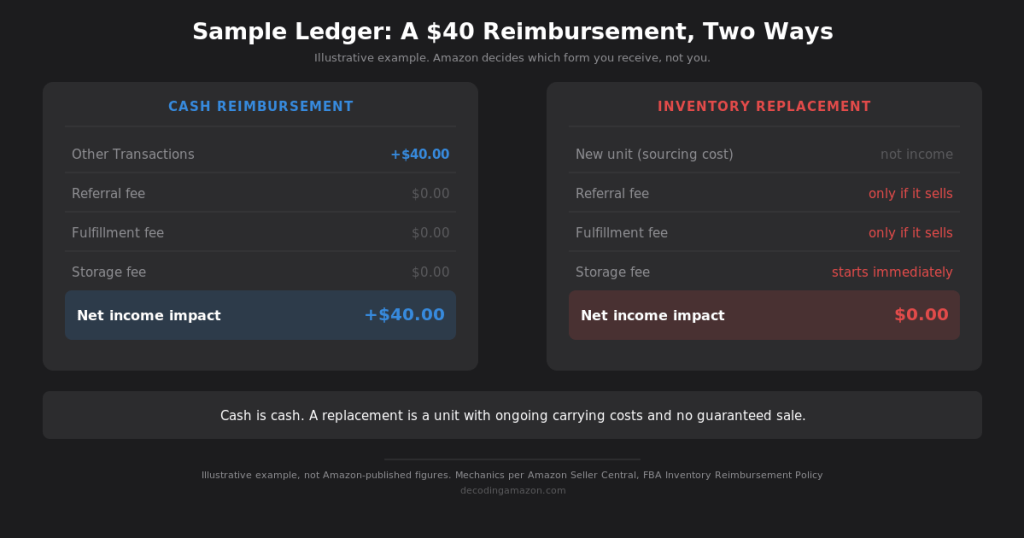
A cash reimbursement lands in your Other Transactions line. No referral fee, no fulfillment fee, nothing deducted. It flows straight to net income. If Amazon lost your item and paid you cash, that cash improves your bottom line dollar for dollar, and under the current sourcing-cost basis for pre-order claims, that amount reflects your manufacturer cost rather than what the item would have sold for.
An inventory replacement works completely differently. It doesn’t appear as income at all. The replacement unit enters your inventory and immediately starts generating costs like storage fees, and if it sells, every normal expense line a unit generates, referral fee, and fulfillment fee included. If a customer returns it, you absorb return processing and more storage.
Worth asking why Amazon would choose to replace rather than just pay cash, since the outcome above is clearly better for you. From Amazon’s side, the incentives run the other way. A replacement doesn’t require Amazon to lay out any cash. It keeps a unit in play for a future sale, where a buyer might still purchase it, rather than paying out on something that may never have sold anyway, the same logic behind the sourcing-cost shift covered earlier. And if that replacement does sell, it generates a fresh round of referral, fulfillment, storage, and other fees for Amazon, fees that a cash reimbursement never produces. None of that benefits you directly. The one place a replacement actually helps you instead of Amazon is if you’re managing toward a specific units-sold target, working toward review velocity or a ranking threshold, where a cash payment doesn’t put product back on the shelf to be sold. This is a read of Amazon’s likely incentives, not something Amazon states directly, so treat it the same as the other inference sections in this post.
The counterintuitive part: a cash reimbursement is better for your P&L than a replacement unit, even though “we’ll send you a new one” sounds like the more generous outcome. A replacement is a unit with ongoing carrying costs and no guaranteed sale. Cash is cash.
One more wrinkle worth flagging before moving on: a reimbursement isn’t always final. Amazon reserves the right to reverse a reimbursement credit if it was issued in error, or if a lost item is later found and returned to your inventory. What actually triggers a clawback and how it shows up in your account is its own topic, and it gets its own post later in this series rather than a paragraph here.
Now that you understand both the mechanism and what it does to your books, the practical question is what to actually do with that knowledge.
Tips: How to Navigate It
A few habits make the most practical difference.
Check the IDR portal’s Eligible for Claim tab on a regular cadence. It’s the fastest read on whether the automation missed something, and it takes a fraction of the time a full ledger reconciliation does.
Know your windows before you need them.
- 60 days for fulfillment center operations claims
- 60 to 120 days for customer returns
- 15 to 75 days for removals lost in transit
- 60 days for other removals
A claim filed a day late isn’t a dispute. It’s closed.
Be honest with yourself about where a reimbursement service earns its cut. The “almost all” gap is real and unquantified, and shipment to Amazon and removal claims are still entirely manual with real documentation requirements. That’s legitimate work worth paying for. Warehouse and customer-return claims, by contrast, are mostly automated now. If a service’s pitch is built around chasing those specifically, ask what they’re actually finding that the automation isn’t.
It’s also worth being honest about where reimbursements rank against everything else competing for your time. At 1 to 3 percent of monthly sales, even a perfectly executed reimbursement strategy is a smaller lever than fixing underperforming listings, tightening PPC, or improving conversion rate. Chase the gap, but don’t let it become where most of your operating attention goes.
The sellers who do best with this system aren’t the ones who treat every short reimbursement as proof Amazon is out to get them. They’re the ones who’ve taken the time to understand the mechanism: what Amazon is actually on the hook for, how a payout gets calculated, and where the system’s real gaps sit, so they can work it instead of just being frustrated by it.
This post covers FBA reimbursements broadly. The posts that follow in this series go deeper on each claim type, starting with Fulfillment Center Operations.
Sources
Amazon Services Business Solutions Agreement, Section F-4 (Storage) https://sellercentral.amazon.com/help/hub/reference/G1791
Amazon Seller Central, FBA Inventory Reimbursement Policy https://sellercentral.amazon.com/gp/help/G200213130
Amazon Seller Central, Changes to Program Policies: 2024 Update to the FBA Inventory Reimbursement Policy https://sellercentral.amazon.com/help/hub/reference/GQHQGBTD7XB7EECN#wjz_cjc_jcb
Amazon Seller Central, Update on Reimbursement Automation and Eligibility Window to File Reimbursement Claims (2024) https://sellercentral.amazon.com/seller-forums/discussions/t/81c3235d-4c44-47ba-96c5-883cecab3244
Amazon Seller Central, Inventory Defect and Reimbursement (IDR) Portal
Amazon, FBA Inventory Reimbursement Policy: Fulfillment Center Operations Claim (archived, January 2022) https://web.archive.org/web/20220125033739/https://sellercentral.amazon.com/gp/help/external/GGEV4254LJJ9BAEG


