

Amazon’s Buyer-Facing Delivery Promise and the Handling Time Requirement
Amazon’s Delivery Promise Explained: What the June 29 Handling Time Requirement Is Really About
In the last few weeks, you have probably received an email about Amazon’s new handling time requirement for seller-fulfilled products. The deadline is June 29, 2026, and, like most Amazon policy announcements, it is being treated mostly as a compliance notice outlining what is changing and what you need to do.
To understand why Amazon is making this change, you have to understand what Amazon is trying to protect. Once you understand that, the requirement starts to make more sense, even if it’s inconvenient for sellers. That is what we will walk through in this post.
Table of Contents
- Introduction
- Amazon’s Goals: Why Delivery Speed Is Central to the Business
- What Amazon Has Promised Every Buyer
- How Amazon Builds That Promise — And What Breaks It
- What the June 29 Handling Time Requirement Is Actually Standardizing
- Who This Applies To, and Who It Doesn’t
- How to Think About Your Options
Amazon’s Goals: Why Delivery Speed Is Central to the Business
Amazon has always had an obsession with delivery speed, and it didn’t start with Prime. It is part of the foundation of the whole company.
In 1997, Jeff Bezos described what online commerce was really offering customers: it “saves customers money and precious time.” By 2001, he was clear about what Amazon was founded on: “two pillars of customer experience: selection and convenience.” Not price, not even product quality. Selection and convenience, the idea that buying from Amazon should be easy, fast, and without friction.
Delivery speed is a crucial pillar of Amazon’s service for buyers. It is not simply a logistics KPI. It is the mechanism that makes “convenient” real. It has become a main driver of customer loyalty in a very direct way. In 2023, Amazon CEO Andy Jassy described what fast delivery actually does to customer behavior: “As we get items to customers this fast, customers choose Amazon to fulfill their shopping needs more frequently.” The faster the delivery, the more often customers come back. The more often they come back, the less they even think about shopping somewhere else.
Amazon has started to quantify this relationship. In the May 2026 announcement that prompted the June 29 handling time requirement, Amazon stated that “every one-day improvement in promised delivery time leads to an average 5% increase in sales.” That points to a business outcome directly tied to the accuracy and speed of the delivery date a customer sees before they click “Buy Now.”
This is the context in which the handling time requirement exists. Amazon has built a business around the proposition that buying here is convenient, and delivery speed is the most measurable expression of that proposition. The delivery promise on a product page isn’t a detail. It is a core piece of the infrastructure for how Amazon generates revenue and keeps customers coming back.
What Amazon Has Promised Every Buyer
For FBA orders, Amazon controls the entire fulfillment process. It picks the item, packs it, ships it, and tracks it. Because Amazon controls every step, it also controls the delivery promise it shows the buyer. If something goes wrong, that is Amazon’s problem to fix.
For seller-fulfilled orders, that isn’t the case. The seller packs and ships the item. Amazon has no visibility into what happens in your personal warehouse. It can’t know if you’re running behind, run out of packing materials, get sick, or have an unusually high volume that week. For seller-fulfilled orders, Amazon has to trust the data you provide.
That distinction is really important because Amazon has spent the last 2+ decades relentlessly compressing delivery times on Amazon fulfilled orders. The speed of Amazon fulfillment has gone from days to overnight, to same-day in major markets. Seller-fulfilled delivery windows, by contrast, often still look like shipping did ten years ago. A wide range of days, loosely estimated. That gap is what this requirement is designed to close.

To understand why that gap matters so much to Amazon, it helps to remember what Amazon is. It is a for-profit company whose growth depends on attracting and retaining buyers. Delivery speed is not just a customer perk. It is one of the main reasons buyers choose Amazon and keep coming back, which is the engine that makes everything else work. In 2014, Jeff Bezos described the mechanism directly:
“FBA completes the circle: Marketplace pumps energy into Prime, and Prime pumps energy into Marketplace.” — Jeff Bezos, 2014 Amazon Shareholder Letter
The flywheel works because Prime members get more selection, and more selection keeps Prime membership valuable. Sellers participate in that flywheel every time a customer has a good experience with their order. They work against it every time an order arrives late. Amazon built this platform, put its name on the delivery promise, and opened it to third-party sellers because doing so advanced Amazon’s own goals. A seller-fulfilled order that misses its delivery date doesn’t just inconvenience a buyer. It costs Amazon the trust it spent decades building.
What makes this concrete is what the buyer actually sees. When a buyer lands on a product page, they see an Estimated Delivery Date. Amazon defines it this way:
“The estimated delivery date (EDD) is the estimated date when the customer is expected to receive the order.” — Seller Central, Estimated Delivery Date
That date is calculated in part from the handling time you set. The shipping policy you configure in Seller Central becomes the delivery range the buyer sees before they click “Buy Now.”
That delivery date is not just a display. Amazon backs it with a formal guarantee. The buyer-facing policy states:
“The A-to-z Guarantee protects you when you buy items sold and fulfilled by a third-party seller. It covers both the timely delivery and condition of your items. You can make a claim directly to Amazon, and our team will check if you’re eligible for a refund.” — Amazon, A-to-z Guarantee
When a seller-fulfilled order misses its delivery date, the buyer can file a claim directly with Amazon. Amazon evaluates the claim and refunds the buyer. Then Amazon looks to the seller. The Seller Central policy is direct about what comes next: “shipping items late for any reason…is likely to result in a granted claim and an immediate debit to your account.”
The delivery promise is not just a suggestion. It is a financial commitment Amazon has made to every buyer, backed by a guarantee it will honor regardless of what the seller actually does.
This is what makes accurate handling time more than a compliance issue. Amazon is asking sellers to give it accurate data so that the promise it displays to buyers reflects reality. When the data is wrong, the promise is wrong. And when the promise is wrong, Amazon pays.
How Amazon Builds That Promise — And What Breaks It
The delivery date a buyer sees is not a guess. It is calculated. Amazon’s policy describes the formula directly:
“Total Delivery Time = Handling Time + Transit Time + any holidays and weekends + additional buffer (to protect delivery promise in case of carrier delivery issues)” — Seller Central, Manage Your Delivery Time
Two components are doing most of the work: handling time and transit time. Transit time is driven by the carrier and the shipping route. Handling time is controlled by the seller, and Amazon defines it this way:
“For seller-fulfilled orders, handling time is the time between when a customer places an order and when you hand it over to a carrier.” — Seller Central, Handling Time Requirement
Amazon takes the number of days you set for handling and adds the carrier transit time to it. That is how they build the buyer-facing delivery date. The buyer sees a date and makes a purchase decision based on that timeframe. Amazon has committed to backing that date with its guarantee. All of that starts with the number you provided.
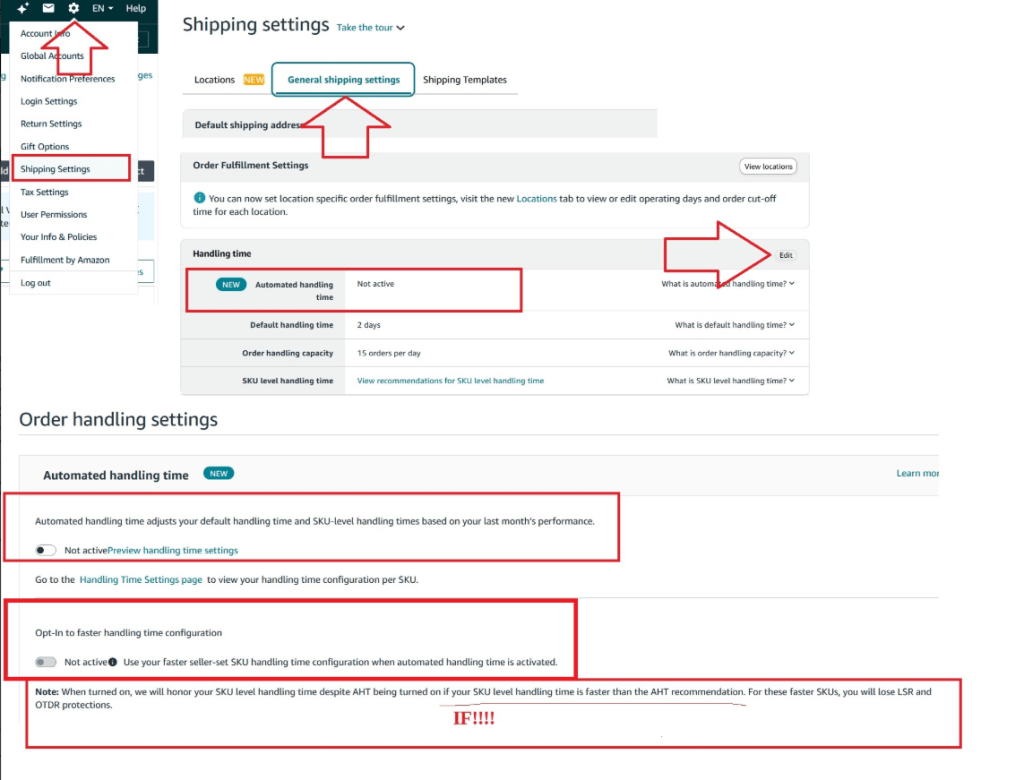
There are three ways to configure your handling time. You can enable Automated Handling Time (AHT), which uses your recent shipping history to calculate and assign handling times per SKU. You can rely on your account-level default, which applies to all products unless you manually change it. Or you can set a handling time manually for each individual SKU. The number you end up with, however it is set, becomes part of Amazon’s delivery date calculation for every buyer who views your listing.
Here is what you have to be aware of. If you set a handling time that is consistently shorter than what you actually ship, Amazon will track this. Amazon’s response is not simply to penalize you. It will adjust what buyers see.
“Promise extensions may be added to your promised delivery time to show buyers shopping on Amazon a promised delivery date with a higher likelihood of an on-time delivery.” — Seller Central, Amazon Promise Extensions
“When a promise extension is added, the customer sees a later date than the ‘Deliver by’ date that you see in Seller Central.” — Seller Central, Amazon Promise Extensions
The trigger is performance. If your on-time delivery rate without promise extensions falls below 95%, Amazon may add additional days to the delivery date buyers see. The system is designed to protect the accuracy of the delivery date, not your operating procedures.
This creates a sticky situation for sellers who set aggressive handling times to win conversions. A seller who sets a one-day handling time but ships in two days will see their buyer-facing delivery date extended by however many days it takes to reflect actual performance. Showing that you are faster than you are, but not fulfilling on time, will cause Amazon to adjust your handling time, which in turn may cost you sales or damage your account health for not fulfilling on time.
A common seller objection at this point is: “But what if I ship faster than I promised? Amazon shouldn’t penalize me for over-delivering.” That thinking misses what Amazon is actually asking for. Amazon is not bothered by fast shipping. It wants you to set a shorter delivery date to begin with, because buyers are making purchase decisions based on the date they see before they click Buy Now.
I recently went looking for a Knicks shirt to buy my nephew before the Finals. There was only one seller-fulfilled option on Amazon, and it showed a delivery date that wouldn’t arrive until after the last game. I spent a significant amount of time searching everywhere else online for an alternative. There were offerings on other sites, but they were 3-4X more expensive there. I eventually placed the order anyway, and the shirt arrived 10 days earlier than the estimate. It made it in time for the final game, and my nephew was thrilled. But I was this close to not ordering at all. The seller shipped fast. Amazon had no way of knowing that from the data the seller provided. The estimate was the only thing I had to go on, and it nearly cost the seller the sale.
That is what Amazon is trying to fix. Long estimated delivery times create doubt in buyers. Doubt leads to abandoned searches, purchases on competing sites, and a weaker ecosystem. Amazon wants accurate, fast estimates that sellers can actually hit, because that is what converts browsers into buyers.
The data makes this concrete. Amazon’s own research shows that more than 85% of seller-fulfilled orders in the US are handled within one day. At the same time, many sellers have handling times set longer than that, which means they are displaying a slower delivery date than their operations actually require. Sellers are leaving sales on the table by underselling the speed of their own fulfillment.
Inaccurate handling times cost sellers in two ways. Set it too short and miss it, and Amazon extends your promise to buyers while your account health takes the hit. Set it longer than necessary, and you display a slower date than you could actually offer, which may cost you sales. Neither outcome is good. Both are self-inflicted.
What the June 29 Handling Time Requirement Is Actually Standardizing
Amazon is not introducing a new category of obligation. It is making one existing input explicit and enforceable.
The requirement is stated directly in Seller Central:
“For seller-fulfilled orders, starting June 29, 2026, we are implementing a new requirement that sellers set accurate handling time for their seller-fulfilled SKUs. Your handling time is considered accurate when the actual handling time consistently matches your configured handling time for each SKU. This will be part of the order management policy which requires you to ship on time and maintain a late shipment rate below 4%.” — Seller Central, Handling Time Requirement
Sellers have always been required to ship on time and keep their late shipment rate below 4%. This does not change that. What it adds is a specific, monitored standard for what “accurate” means when it comes to handling time. The number you set has to reflect what you actually do.
There are two paths to compliance.
The first is to enable Automated Handling Time. Amazon describes it this way:
“Automated handling time sets handling times for your SKUs based on your recent shipping history and provides late shipment rate protection, so you can comply with our order management policies without monitoring individual SKUs.” — Seller Central, Handling Time Requirement
This is the path that Amazon recommends. You allow Amazon to set handling time based on your actual history, and provide LSR (Late Shipment Rate) protection. If you already have AHT enabled, then you do not need to do anything else.
There is one exception worth knowing if you already have AHT enabled. If you believe AHT’s recommendation is too conservative, for example, you have genuinely sped up your fulfillment, and AHT has not caught up yet, you can opt for a faster handling time configuration. This lets a SKU use your own seller-set handling time instead of AHT’s, as long as your number is faster than what AHT calculated. The tradeoff is real: you lose late shipment rate and on-time delivery rate protection for any SKU using this opt-in. AHT can also take up to three weeks to recognize an improvement in your fulfillment speed on its own, so this exists for sellers who do not want to wait that long.
The other path is to continue managing handling time manually. If you choose this path, Amazon monitors each SKU over a rolling 30-day period. If a SKU is consistently shipped at least one day faster than the handling time you have chosen, it gets flagged as non-compliant, and you receive a notification. From that point, you have 30 days to correct it.
If you do not correct it within 30 days:
“If accurate handling times are not set within 30 days after receiving a notification, we’ll monitor and adjust on your behalf for the next 180 days and grant you late shipment rate protection for any SKU we updated. You won’t be able to change your handling time during this period.” — Seller Central, Handling Time Requirement

This is a very important point. The consequence of non-compliance is not a suspension or a fee. Amazon will set your handling times to reflect how you have already been operating. If you consistently ship a day earlier than stated, they will move up your official time by one day. In Amazon’s eyes, the delivery promise should not only be fast, but accurate. And if you can provide items faster than you say, it is possible to create more sales by showing the true handling and delivery times to the buyer to make the purchase decision.
One more detail matters here. Warning notifications begin on June 29, not Amazon, enforcing a handling time change. Amazon is creating metrics on your handling times currently, and for any SKU that is not in alignment with its stated handling time, you will receive a notification that you have 30 days to fix it. Sellers who are able to manage their handling times starting now might not get any notifications at all.
Who This Applies To, and Who It Doesn’t
Let’s be clear about who this policy update actually affects, because not every seller has to act on June 29.
The requirement applies to Professional sellers with seller-fulfilled SKUs. Seller Central states it plainly:
“This requirement is only applicable to Professional sellers.” — Seller Central, Handling Time Requirement
If you are on an Individual selling plan, this does not apply to you.
If you sell exclusively through FBA, this does not apply either. Amazon controls the fulfillment process, which means they control the delivery promise. Sellers are not responsible for on-time delivery on FBA orders, and if a buyer complains about late arrival, Amazon will take responsibility and strike through the feedback you receive. Read more about how that process works.
If you are a Professional seller with seller-fulfilled listings, there is one set of exceptions at the product level:
“This requirement does not apply to custom, handmade, perishable, and Heavy & Bulky less-than-truckload shipments.” — Seller Central, Handling Time Requirement

That exemption list covers four distinct seller types. If you fall into any of them, June 29 is not your deadline. But the delivery promise still is.
Your handling time still feeds into the estimated delivery date Amazon calculates and shows buyers. Amazon still backs that date with its guarantee for every buyer, regardless of what category you sell in:
“The A-to-z Guarantee protects you when you buy items sold and fulfilled by a third-party seller. It covers both the timely delivery and condition of your items.” — Amazon, A-to-z Guarantee
If a buyer files a claim, the seller-facing policy applies without exception:
“Shipping items late for any reason…is likely to result in a granted claim and an immediate debit to your account.” — Seller Central, Prevent an A-to-z Guarantee Claim
The exemption removes the compliance requirement. It does not remove the promise.
For custom and handmade sellers, your handling time needs to account for production plus fulfillment, not just the time to pack a finished item. The buyer sees one delivery date. It has to reflect the full time from order receipt to carrier handoff. For perishable sellers, the stakes are higher than for any other category. The A-to-Z Guarantee covers both timely delivery and condition. A perishable may arrive damaged or spoiled, which opens both a delivery claim and a condition claim simultaneously. For Heavy & Bulky LTL sellers, the exemption exists because freight scheduling makes tight, standardized handling times difficult to enforce. But the delivery window buyers see should still reflect your actual freight lead times.
While you are not subject to the monitoring, you are still subject to the promise.
For everyone else, the requirement applies. If you already have Automated Handling Time enabled, no action is needed. Amazon is already setting your handling time based on your shipping history. If you are managing handling time manually, Section 7 covers how to think about what to do next.
How to Think About Your Options
If you are a Professional seller with seller-fulfilled standard products, managing handling time manually, you have a decision to make before June 29. Here is the framework around the decision.
The first option is to delegate to Amazon and enable AHT so that they can calculate your handling time for each SKU from your actual shipping history. You get LSR protection, remove the monitoring stress, and stay compliant without tracking individual SKUs. You give up some granular control, but for most sellers that is a reasonable tradeoff. AHT is an automated system and may not perfectly reflect the nuances of every catalog. If you believe your handling times have been set inaccurately, Amazon provides an appeal process through Seller Support to request reinstatement of manual control.
The second option is to self-manage, where you keep manual SKU-level control and take the responsibility for accuracy on yourself. Depending on the size of your catalog, this can be a significant amount of work. If your shipping is consistently faster than what you have set, you will receive a notification and have 30 days to update. You can track SKU-level handling time performance in the Handling Time Report, available under Inventory > Manage Seller Fulfilled Products. This path makes sense if you have legitimate operational reasons to set specific handling times that your history alone would not reflect.
However, both options lead to the same place: accurate handling times. The choice is about who sets the handling time.
Some sellers deliberately set longer times. Two days when you usually ship in one. This could be as a buffer for a sick day, a surge in orders, an issue with the carrier, or the notion of under-promise and over-deliver. Shortening that buffer is a real operational change and not to be overlooked. The buffer, though, is causing buyers to question whether they should make a purchase decision or not.
Set it too long and buyers see a slower delivery date than you can actually hit, which costs you conversions. Set it too short and miss it, and Amazon extends your promise while your account health takes the damage. The buffer does not eliminate risk. It just hides it.
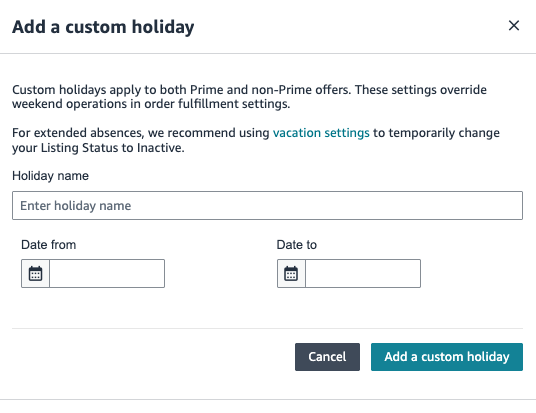
For the situations sellers are actually worried about, Amazon has built specific tools for these moments. If you know you are going to be out, on vacation, want a long weekend, have an illness, or any other day you know you will not ship, seller-set holidays let you mark non-operating days on your calendar in advance:
“Seller-set holidays (custom holidays) are configurable non-operating days that you can set for your account, which extend shipping and promised delivery date by the number of days you’ve set as holidays. You can still receive orders on custom holidays.” — Seller Central, Manage Holiday Settings
Seller-set holidays are not the only option here, and they are not always the right one. Holidays keep your listings active. You still receive orders, and the promised delivery date simply moves out by the number of holiday days you set. That works when you can still ship, just on a delay.
If you genuinely cannot fulfill orders at all, a family emergency, an actual vacation, anything that takes you fully offline, the better tool is Listings Status. Setting your status to Inactive removes your seller-fulfilled listings from Amazon product pages and search results within an hour. You stop receiving new orders entirely.
“If you can’t fulfill orders for any reason (family emergency, inclement weather, going on holiday or vacation, etc.), you can change your Listings Status to Inactive. This will remove your self-fulfilled listings from Amazon product detail pages and search results within one hour.” — Seller Central, Listing Status for Vacations, Holidays, and Other Absences
A few things to plan around. Pending orders are not canceled automatically, so set your status before you leave, not the day of. You still have to respond to messages and return requests within 24 hours, even while inactive. Monthly subscription fees keep charging regardless. And if you also sell through FBA, those listings stay active. Only your seller-fulfilled listings go dark.
For order surges, order handling capacity lets you set a daily limit on how many orders you can ship. Once you hit it, Amazon automatically extends handling time by one day for any new orders that arrive. For unexpected disruptions like extreme weather or a carrier failure, you can temporarily extend SKU-specific handling time until operations return to normal.
These tools exist because Amazon knows real businesses have bad days. The buffer handles disruptions by inflating your handling time permanently. These tools handle them without that cost.
There is one limit worth noting:
“Sellers in the US store can set a maximum of 30 days as holidays in a year and a maximum of 10 consecutive days of holidays.” — Seller Central, Manage Holiday Settings
The bigger point is that accurate handling time is not just a compliance checkbox. It is a competitive input. Amazon explicitly says:
“Items with a faster delivery date are more likely to become a Featured Offer.” — Seller Central, Manage Your Delivery Time
A faster, accurate delivery promise improves your Buy Box eligibility. An inaccurate one, whether set too long or missed when set too short, degrades the delivery date buyers see and reduces conversions. The data Amazon shared in its own announcement is the clearest argument for getting this right: every one-day improvement in promised delivery time leads to an average 5% increase in sales.
That is a platform-level metric, not a guaranteed outcome for any individual seller or SKU. But the mechanism behind it is real. As more sellers shorten their handling times and more buyers find delivery dates they trust, more purchases happen on Amazon overall. The flywheel turns faster. Individual sellers benefit from that volume even when the 5% does not map directly to any single listing.
There is a third option that could be considered if it is possible for your specific catalog. That option is to move as many SKUs as possible to FBA. If the handling time requirement highlights a difference between how you operate and what Amazon’s platform requires, moving to FBA removes the question entirely. Amazon controls the fulfillment process, the delivery process, and the accountability for hitting it. The tradeoff is fees and operational control. For many sellers, that is a willing tradeoff.
Sellers who decrease handling times are not simply doing Amazon a favor; they are running a business that is optimizing for more sales. Accurate handling times are the input; faster delivery, more Featured Offer placements, and stronger conversions are the output. That is not a coincidence. Amazon built the platform so that sellers who serve buyers well sell more. Accurate handling time is one place where that equation shows up.
Sources
Jeff Bezos, 2014 Amazon Shareholder Letter https://www.sec.gov/Archives/edgar/data/1018724/000101872415000006/0001018724-15-000006-index.htm
Seller Central, Estimated Delivery Date https://sellercentral.amazon.com/help/hub/reference/G201714160
Amazon, A-to-z Guarantee https://www.amazon.com/gp/help/customer/display.html?nodeId=GQ37ZCNECJKTFYQV
Seller Central, Prevent an A-to-z Guarantee Claim https://sellercentral.amazon.com/help/hub/reference/GCRVNRBZBVGBK543
Seller Central, Manage Your Delivery Time https://sellercentral.amazon.com/gp/help/G202167920
Seller Central, Handling Time Requirement https://sellercentral.amazon.com/help/hub/reference/GD559HDD5ZUZ8LNM
Seller Central, Amazon Promise Extensions https://sellercentral.amazon.com/help/hub/reference/GEJ7Z6AWFB774DBB
Seller Central, Handling Time Requirement — Supporting Data (85% handled within one day) https://sellercentral.amazon.com/help/hub/reference/GAGMYMUUPJB4XPJ9
Decoding Amazon, Why Amazon Removes Seller Feedback (internal link) https://decodingamazon.com/amazon-seller-feedback-removal/
Seller Central, Handling Time Report https://sellercentral.amazon.com/seller-fulfilled-product/analytics/
Seller Central, Manage Holiday Settings https://sellercentral.amazon.com/help/hub/reference/GEDSVA3D58NL292F
Seller Central, Listing Status for Vacations, Holidays, and Other Absences https://sellercentral.amazon.com/help/hub/reference/G200135620


