

Why Amazon Removes Seller Feedback (And Why Most of It Stays)
Most Amazon sellers have been there. A buyer leaves negative feedback that has nothing to do with you as a seller. It is a product complaint, a sizing issue, a color mismatch, and it lands on your account anyway. You search for how Amazon seller feedback removal works. You find out there is a process. You submit a request. It gets denied.
The process exists because Amazon built it. It’s narrow because Amazon intended it to be. Understanding exactly where the lines are, and why they’re drawn there, is the difference between a removal request that works and one that wastes your time or makes things worse.
This post covers both systems, the full removal criteria, the two outcomes (removal vs. strike-through), the process landmines that get sellers in trouble, and what actually works when the formal removal path fails.
Table of Contents
- Two Systems, One Confusion
- Why the Removal Process Exists
- What Gets Removed vs. Struck Through
- The Process Landmines
- What You Actually Control
Two Systems, One Confusion
Most sellers know the difference between seller feedback and product reviews, but we’ll recap it anyway.
Think of it like critiquing a behavior versus critiquing the individual. Saying that a behavior is bad doesn’t mean the person exhibiting that behavior is bad. They’re two separate things, and conflating them leads to bad conclusions.
Product Reviews vs. Seller Feedback
Product reviews are the buyer’s opinion of the product. They live on the product detail page, they’re visible to every buyer considering that item, and they’re shared across every seller on that listing.
Seller feedback is different. Amazon defines it this way:
“Seller Feedback is the buyer’s opinion about their entire post-order experience. It reflects on how well you performed on meeting buyer expectations in terms of packaging, shipping, accuracy of product description, condition of product, and customer service.”
Amazon, Managing Your Seller Feedback
It’s also inherent in the name. There is a product review and seller feedback.
These two systems are trying to answer two completely different questions. Product reviews seek to answer: “What do you think of the product?” Seller feedback seeks to answer: “What do you think of this seller?”

When it comes to seller feedback, Amazon has guidelines for buyers leaving it:
“Your comments, feedback, and ratings should focus on your buying experience.”
Amazon, Comments, Feedback, and Ratings about Sellers
The page then lists the questions a buyer should be considering: Was shipping fast? Was the item packed well? Was the product as described? Would you buy from this seller again?
Notice what’s missing from that list: whether the buyer liked the product.
The Problem Amazon Built
Here is where we find a 3-way tension. Amazon built two systems, each with their own purpose. The issue is that buyers don’t always know which system they’re using. When a buyer receives their order and is unhappy, they’re not thinking about which system they should be using. They’re thinking about their experience, and sometimes it was a bad product, not a bad seller.
Amazon recognizes this can happen, and they understand the impact it can have on sellers. That’s why the buyer-facing policy clearly states:
“Product reviews: Review products on their product detail page.”
Amazon, Comments, Feedback, and Ratings about Sellers
However, because buyers can’t be counted on to know which system to use, or understand the impact their feedback will have on the seller who receives it, the burden falls on the system to catch what the buyer missed.
Why This Affects Every Seller Type
Seller feedback works very differently from product reviews. While reviews are shared by all sellers on a listing, their true impact is at the item level, not the seller account level. And that distinction is very important.
This has an impact for every type of seller. Your account standing is far more important than the ranking and rating of any individual product. And account standing touches things that matter: your Order Defect Rate, your Buy Box eligibility, and your overall account health. We’ll get into exactly how in the next section.
Why the Removal Process Exists
Amazon does have an automated process for removing seller feedback, but it is not fully reliable. There is a reason a manual process also exists, and Amazon has been consistent about this from the beginning. From 1997 through this past year there has been a similar mentality:
“We seek to be Earth’s most customer-centric company. We are guided by four principles: customer obsession rather than competitor focus, passion for invention, commitment to operational excellence, and long-term thinking.”
Amazon, Form 10-K, Fiscal Year 2025
Customer obsession rather than competitor focus. This distinction matters. It helps to explain why the feedback system was built the way it was and how it is managed. The system exists to give buyers a reliable way to evaluate sellers, not the other way around.
This was actually captured in CEO Bezos’s own words when making the decision to allow negative reviews and feedback in the first place:
“Though negative reviews cost us some sales in the short term, helping customers make better purchase decisions ultimately pays off for the company.”
Jeff Bezos, 2003 Amazon Shareholder Letter
While he was specifically talking about product reviews, the logic applies just as directly to seller feedback. Amazon is willing to accept some level of seller discomfort if it means buyers get more reliable information. This is a founding principle of Amazon.
Now that we understand that seller feedback exists to help buyers evaluate specific sellers, which in turn builds trust between sellers and the platform, we can start to make sense of the removal process. If a buyer accidentally, or even purposely, leaves a product opinion in the seller feedback box, that doesn’t serve the purpose intended. That is needless harm for something the seller is not in control of. To deal with this, Amazon built a removal path for specific cases because the system they designed created the problem.
This is a very thoughtful move on Amazon’s part. If the system they set up creates issues for sellers, they have a chance to remove it. While sellers could argue that if Amazon set the policies, they should auto-remove whatever violates those policies, at least there is a process for removal.
Why This Is More Than a Reputation Problem
Seller feedback is not just a rating for your benefit. It feeds directly into your ability to win the Buy Box and make sales on the platform.
To understand why, it helps to know what Amazon is actually optimizing for. Their own 10-K puts it plainly:
“To increase sales of products and services, we focus on improving all aspects of the customer experience, including lowering prices, improving availability, offering faster delivery and performance times, increasing selection…and earning customer trust.”
Amazon, Form 10-K, Fiscal Year 2025
Low prices, fast shipping, broad selection, and customer trust. Seller feedback is one of the ways Amazon measures whether a seller is contributing to that last one. And they quantify it in part through your Order Defect Rate.
Amazon defines ODR as:
“A key measure of your ability to provide a good customer experience…the percentage of orders with one or more indicators of poor customer service during a given 60-day time period.”
Amazon, Order Defect Rate
ODR is made up of three components: your negative feedback rate, your A-to-z Guarantee claim rate, and your credit card chargeback rate. Negative feedback is one of those three inputs. It is not the only one, but it is a direct one.
The threshold Amazon requires sellers to stay under is 1%. The consequence for crossing it is stated plainly:
“An order defect rate above 1% may result in a restriction of your selling privileges, including suspension of seller-fulfilled offers.”
Amazon, Order Defect Rate
It’s worth noting that the specific consequence Amazon spells out here is directed at seller-fulfilled offers. If your ODR crosses 1%, it is your seller-fulfilled listings that are at direct risk of suspension per this policy.
For FBA sellers, the sourced impact is different but still real. Buyer feedback ratings are displayed publicly on the Offer Listings page when buyers are comparing sellers:
“If you have more than 10 buyer feedback entries over the previous 12 months, buyers will see your 12-month feedback rating and lifetime feedback total ratings in the following format on the Offer Listings page: XX% positive over the past 12 months.”
Amazon, About Feedback Manager
That rating is visible at the moment a buyer is deciding who to purchase from. A low feedback score is something buyers can see and act on before they ever click Add to Cart. For FBA sellers competing on a shared listing, that visibility matters.
The bottom line is that negative feedback has consequences regardless of how you fulfill. For seller-fulfilled offers it runs directly through ODR. For FBA sellers it shows up where buyers make decisions. Either way, a piece of misplaced feedback that should never have counted against you can move numbers that matter to your business. That is why removal matters, and why knowing exactly when it is possible is worth understanding.


What Gets Removed vs. Struck Through
Before getting into the feedback removal criteria, it is important to state Amazon’s involvement. Amazon states:
“Amazon removes seller feedback that does not adhere to our guidelines at time of submission. This means you do not need to request your feedback to be removed because we determine if seller feedback is within our guidelines before it is posted.”
Amazon, Managing Your Seller Feedback
However, the automation is not fully reliable. Things slip through the cracks. That is why there is a process for removal that a seller can initiate. While it is great that the system exists, it means inherently that Amazon’s automation cannot be relied upon. This is similar to reimbursements, where Amazon has automated systems but there is a manual ability to audit because it is not 100% reliable. The pattern here is worth noting: even with Amazon’s automation, there is still work for the seller to do.
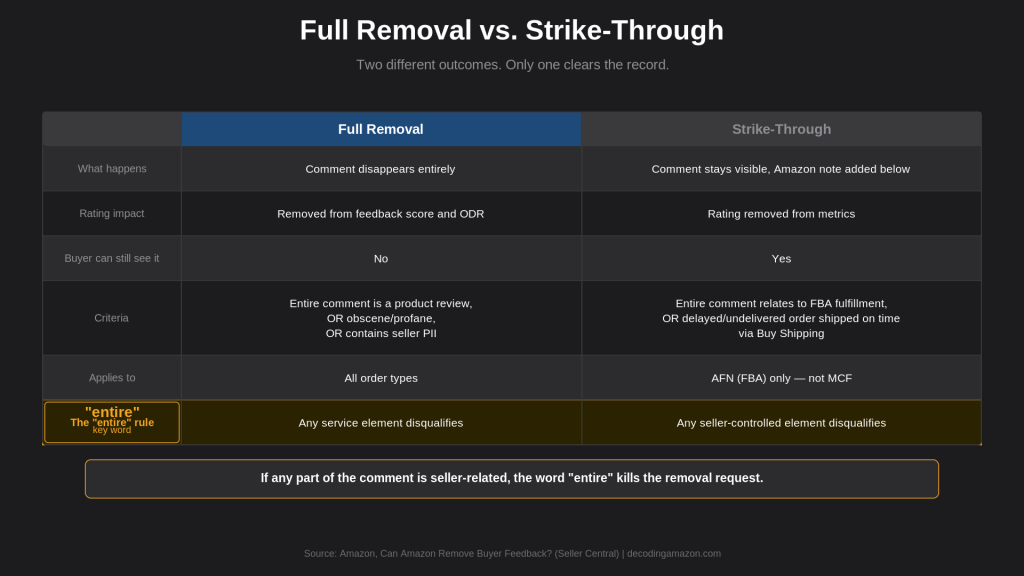
There are two outcomes when dealing with feedback removal that are important to understand: full removal and strike-through. They are not the same thing.
Full Removal
Amazon will fully remove feedback in three situations:
“The feedback includes words commonly understood to be obscene or profane.”
“The feedback includes seller-specific, personally identifiable information, including email addresses, full names, or telephone numbers.”
“The entire feedback comment is a product review. For example, ‘The Acme Super-Widget lacks the sharpness and speed of the Acme Ultra Widget.'”
Amazon, Can Amazon Remove Buyer Feedback?
When feedback is fully removed, its impact is also removed from your feedback rating and your ODR.
The third situation requires careful reading because it is the wording of the policy that determines the outcome of a removal attempt.
The word “entire” is doing a lot of work in that third criterion. If a comment contains both a product opinion and anything about the seller’s service, Amazon will not remove it. Here is the example Amazon gives:
“If the comment contains both a product review and feedback about your service, we will not remove the feedback. For example, ‘Seller’s shipping service was very slow, and the Acme Super-Widget lacks the sharpness and speed of the Acme Ultra Widget.'”
Amazon, Can Amazon Remove Buyer Feedback?
One sentence about shipping is enough to keep the entire feedback on record, even if only half of it should be there. This is the most common reason a removal request gets denied, and there is no exception for it. By removing the feedback it would also remove the part buyers legitimately want to know about the seller themselves.
This criterion applies specifically to seller-fulfilled orders.
Strike-Through
Strike-through is a separate outcome. Even when stricken through, the feedback stays visible to buyers. What changes is that the negative rating is removed from your metrics, which is a meaningful distinction.
Amazon will strike through feedback in two situations.
If the entire comment relates explicitly to fulfillment and service for an order fulfilled by Amazon, the following statement appears under the feedback:
“This item was fulfilled by Amazon, and we take responsibility for this fulfillment experience.”
If the entire comment is related to a delayed or undelivered order that was shipped on time using Buy Shipping services, the statement reads:
“The fulfillment issues associated with this order were not due to the seller.”
Amazon, Can Amazon Remove Buyer Feedback?
Notice that Amazon uses the word “entire” again. Just as with full removal, if any portion of the feedback refers to something seller-controlled, the strike-through does not apply.
The FBA limitation sellers miss is that strike-through only applies to orders fulfilled through AFN, Amazon’s Fulfillment Network. This is the standard FBA process where the purchase and fulfillment both happen on Amazon.com. However, a Multi-Channel Fulfillment order is not eligible for strike-through, even though Amazon is the shipper of record:
“The buyer feedback strike-through only applies to items sold on Amazon and fulfilled through the Amazon fulfillment network (AFN). A merchant-fulfilled order on Amazon, even if submitted as a Multi-Channel Fulfillment order, is not eligible for buyer feedback strike-through.”
Amazon, Buyer Feedback for FBA Listings
If you use FBA for your Amazon orders but also use Multi-Channel Fulfillment for other channels, those MCF orders do not qualify. The strike-through is limited to AFN. But keep in mind they all live on the same account equally.
What Strike-Through Actually Means
It is easy to read “Amazon takes responsibility” and assume that means the feedback disappears. It does not. The comment remains on your profile and future buyers can still read it. Amazon’s note sits below it, but the buyer’s words are still there.
The practical difference between removal and strike-through is that removal cleans the record. Strike-through neutralizes the metric impact but leaves the public record intact.
The Process Landmines
Before you think that knowing the removal criteria is all you need, there are specific situations where sellers make things worse while trying to fix them. Most of them come down to not reading the process instructions as carefully as the removal criteria.
Landmine 1: Using the Wrong Channel
When a seller sees feedback they believe should be removed under Amazon’s policies, the instinct is to open a case with Seller Support or contact Amazon directly. That is not the correct path.
Amazon is clear about what they expect:
“Requests to review feedback can only be made via Feedback Manager, and usage of any other channel to request the same may potentially result in the deactivation of your selling account.”
Amazon, Request Feedback Review
Feedback Manager only. Not Seller Support, not Contact Us, not a support ticket. The path is Performance, then Feedback, then locate the Order ID, then select Request Review from the Actions column. Going anywhere else is not just ineffective, it carries a deactivation risk.

Landmine 2: Waiting Too Long
There is a hard deadline on how long you have to initiate a removal request:
“Feedback disputes must be made within 90 days of the feedback submission. The system will prevent feedback removals after 90 days.”
Amazon, Request Feedback Review
After 90 days, it does not matter how clear the violation is, or that Amazon’s automated process failed to catch it. The system will not accept the request. There is no escalation path and no exception.
Again, this is a situation where sellers cannot rely on Amazon’s process and must stay aware of what is happening in their account.
Landmine 3: Asking the Buyer to Remove It
Sellers are allowed to contact buyers after resolving an issue. What they cannot do is ask the buyer to remove the feedback. Amazon is clear about what they allow and what they do not.
Allowed:
“We want to thank you for the feedback you provided for our business and we hope we have resolved any issue you were facing to your satisfaction.”
Not allowed:
“If we have resolved the issue you were facing, can you delete your feedback?”
Amazon, Resolve or Respond to Buyer Feedback
The difference is clear. Amazon wants sellers to be proactive in making buyers happy, not making buyers happy so that the buyer does a favor for the seller. Amazon states it directly:
“Pressuring or incentivizing a buyer to remove or modify negative feedback is a violation of our policies.”
Amazon, Resolve or Respond to Buyer Feedback
Buyers can voluntarily remove their feedback within 60 days of leaving it, but that is entirely their decision to make. Sellers cannot prompt it, request it, or tie it to a resolution.
The Timeline That Closes Both Doors
This is where the 90-day and 60-day windows interact in a way that matters.

- Day 0: Buyer submits feedback
- Day 60: Buyer’s voluntary removal window closes. After this point, even if the buyer wanted to remove it, they cannot.
- Day 90: Seller’s removal request window closes. After this point, the system will not process a request regardless of merit.
If a buyer leaves negative feedback and you do not notice it until Day 75, you have 15 days left to submit a removal request through Feedback Manager. But the buyer’s window to voluntarily remove it has already been closed for two weeks. If Amazon declines your request, there is nothing left to do. Both doors are shut.
This makes consistent monitoring of your Feedback Manager not just a best practice but a business necessity.
What You Actually Control
The honest and frustrating truth is that the likelihood of removing all negative feedback left on your account is very low. The criteria is narrow, the appeal process is hard to navigate, and buyers are trusted and protected by design. The feedback system was built to give buyers confidence in the platform, not to help sellers improve their rating. Buyers can and will occasionally abuse it, but that is a cost Amazon has decided is worth bearing in exchange for buyer trust.
This is not meant to be discouraging, but to put sellers in the right frame of mind. Here are the options available when a removal request is denied.
The Public Reply
When feedback cannot be removed, you can leave a public reply. It will not change your score or remove the feedback, but it gives you the ability to have your side of the story visible to anyone who reads your profile.
Amazon explains it this way:
“A public reply can be viewed by anyone who is looking at your Seller Profile Page. Your response appears directly below the feedback you are responding to. That means your response doesn’t just speak to the buyer who left the feedback, but future visitors to your profile page as well.”
Amazon, Managing Your Seller Feedback
The buyer who left the feedback has already made up their mind, and after 60 days they can no longer remove it even if they wanted to. The public reply is for the next buyer who reads your profile and sees the negative comment. Your response tells them how you handle problems.
Amazon provides guidance on how to approach it:
Do:
“Start by thanking the reviewer for providing feedback about their experience. Address any concerns, share your selling policies, and assure that you reached out to help.”
Do not:
“Delay your response time…lose your cool when responding.”
Amazon, Managing Your Seller Feedback
A slow or defensive reply can be worse than no reply at all. There are two policy details worth knowing before you write one.
First, once submitted it cannot be edited, only deleted:
“Once submitted, responses can be removed, but they cannot be changed.”
Amazon, Post a Public Reply
Second, if you delete it, you cannot submit a second one. And buyers cannot respond to public replies at all:
“Don’t ask the buyer questions or start a dialogue because buyers cannot respond to your public reply.”
Amazon, Managing Your Seller Feedback
One shot.
If you submit a public reply and delete it, you cannot submit a second one. There is no edit option after submitting. Write it once, write it carefully, and write it for the next buyer reading your profile, not for the buyer who left the feedback.

It is a statement, not a conversation. Write it carefully the first time.
When the Initial Request Gets Denied: The Escalation Path
A denied removal request is not always the end of the road. Amazon has an escalation path that goes through their Community Moderation team, separate from Feedback Manager. The process, documented in Amazon’s own seller forums:
- Visit Customer Service
- Select Help with something else, then Something else, then Amazon Community, then Customer Reviews, then Violations of our Guidelines, then I need more help
- Select Send us an email
- If no response within 3 to 5 business days, create a new thread in the Manage Buyer Experience category on Seller Forums, include your case ID, and request escalation
- When resubmitting, include any evidence from Buyer-Seller Messaging that supports your case, such as proof that a return label was provided or a resolution was offered
“If you have submitted via the method above and haven’t heard back in 3-5 business days, please let us know by creating a new thread in the ‘Manage Buyer Experience’ category, include your support case ID, and we’ll look into escalation options.”
Amazon, Process Update: Reporting Product Reviews (Seller Forums)
Beyond the official escalation, sellers have also had success tagging Amazon community moderators directly in forum threads. This is a seller community practice, not an officially documented Amazon process, but it does exist and has worked. It matters because the forum system is separate from your account, which means it does not auto-close the way a Seller Support case can when a previous case on the same feedback already exists.
A real example worth looking at: a seller recently posted a removal request for the feedback “Color way off and it does not fit my 2021 jeep wrangler but your site says it does.” The seller argued it was entirely a product review, and the initial request was denied. Rather than accepting the outcome, the seller went through the forum escalation path, tagged Amazon community moderators, and the feedback was ultimately removed. The lesson is not just that the escalation path exists. It is that using it correctly, with documentation and persistence, can get results that the standard Feedback Manager request could not.
Root Cause Is the Real Lever
Once negative feedback lands on your account, everything you do from that point is reactive. Removal request, appeal, message to buyer, public reply. All of it is after the fact.
The real control is upstream. Amazon’s own best practices page lays it out as a straightforward list: stockouts, late shipments, inaccurate product descriptions, customer service response times. Every one of those is something a seller can address before a buyer has a reason to leave negative feedback.
Accurate listings, realistic shipping commitments, and responsive customer service will generate less negative feedback than relying on removal requests and appeals to clean up the record after the fact.
How Long Does Negative Feedback Actually Affect You
Feedback does not disappear, but its impact changes over time. Amazon tracks your score in four buckets: 30 days, 90 days, 365 days, and lifetime. These are all visible in your Feedback Manager.
What buyers see on your offer listing page is your 12-month rating, provided you have at least 10 feedback entries in that period. After a year, a negative piece of feedback falls out of that calculation. But it stays in your lifetime score permanently.
ODR is calculated on a 60-day window specifically. A negative that is more than 60 days old no longer affects your current ODR calculation, even if it is still visible in your profile.
One more data point worth knowing: industry estimates put the seller feedback rate at less than 1% of orders. Most buyers never leave feedback at all. That means your score is being built from a very small sample, which cuts both ways. One strong run of positive feedback moves the number quickly. So does one concentrated stretch of negatives.

Building a Cushion: Proactive Feedback Strategy
One negative piece of feedback among 300 positive ones does not carry the same weight as one among 50. The math is straightforward. Amazon displays your rating as a percentage of positive feedback over the past 12 months. The more legitimate positive feedback you have, the less damage any single negative can do.

This is not just a recovery strategy. It is a buffer sellers can build in advance.
Amazon actually encourages this directly:
“We also encourage our merchants to actively manage feedback by doing the following: Solicit feedback in all communications that go out to the customer, such as the packing slip.”
Amazon, Serving Customers Well: Feedback Matters
And:
“You may request feedback and reviews from your own customers in a neutral manner.”
Amazon, Selling Policies and Seller Code of Conduct
The key word is neutral. There are specific lines sellers cannot cross:
“Pay for or offer an incentive (such as coupons or free products) in exchange for providing or removing feedback or reviews.”
And critically:
“Solicit reviews only from customers who had a positive experience.”
Amazon, Selling Policies and Seller Code of Conduct
That second restriction is the one most sellers do not know about. Sending follow-up messages only to buyers you think had a good experience and staying quiet with the others is a policy violation. You can ask all your customers. You cannot filter for the happy ones.
There is also a hard constraint on how you reach buyers. Buyer-Seller Messages must be:
“necessary for fulfilling the order or providing customer services. Marketing communications are prohibited.”
Amazon, Selling Policies and Seller Code of Conduct
You cannot send a standalone message whose only purpose is to ask for feedback. The request has to be embedded in a legitimate order communication: a packing slip, a shipping confirmation, or a follow-up that is genuinely tied to customer service.
Amazon also provides a native Request a Review button in Seller Central that sends a templated, Amazon-managed message to the buyer. It is the most straightforward compliant path for a direct feedback request.
The broader point is this: the best defense against a negative piece of feedback is a strong volume of positive feedback surrounding it. Removals, appeals, and public replies are reactive. A proactive feedback strategy is the only tool that works before the problem arrives.
What This Post Is Part Of
Amazon’s own Customer Service Performance page opens with this:
“Amazon policies maintain a marketplace that is safe for buyers and fair to sellers. Violations of these policies may result in content removal or account deactivation.” Amazon, Customer Service Performance (Account Health)
Safe for buyers, fair to sellers. Those are not the same standard. Safe is an absolute threshold. Fair is a relative one, and Amazon defines what fair means. The removal criteria in this post are Amazon’s answer to that question. Narrow criteria, hard deadlines, and a process that defaults to leaving feedback in place are all consistent with a platform that is optimizing for buyer trust first.
The feedback system is frustrating precisely because it was designed for buyers, not for you. That’s not a design flaw. It is the same logic covered in the first post on this blog. Once you understand what Amazon is optimizing for, the removal criteria stop feeling arbitrary. They’re narrow because Amazon needs buyers to be able to trust the feedback they read. The process landmines are real, but they’re avoidable if you know them going in.
Every post on Decoding Amazon is built around the same question: what is Amazon optimizing for, and what does that mean for your account? If that’s useful to you, subscribe below. New analysis drops alongside the YouTube channel.
Get new posts by email.
Policy breakdowns and platform analysis. No filler.
Sources
- Managing Your Seller Feedback: Seller Central Help
- Comments, Feedback, and Ratings about Sellers: Amazon Help
- Can Amazon Remove Buyer Feedback?: Seller Central Help
- Buyer Feedback for FBA Listings: Seller Central Help
- Request Feedback Review: Seller Central Help
- Resolve or Respond to Buyer Feedback: Seller Central Help
- Post a Public Reply: Seller Central Help
- About Feedback Manager: Seller Central Help
- Order Defect Rate: Seller Central Help
- Serving Customers Well: Feedback Matters: Seller Central Help
- Selling Policies and Seller Code of Conduct: Seller Central Help
- Process Update: Reporting Product Reviews: Amazon Seller Forums
- Customer Service Performance: Account Health, Seller Central
- Amazon Form 10-K, Fiscal Year 2025: SEC EDGAR
- Jeff Bezos, 2003 Shareholder Letter: About Amazon IR


